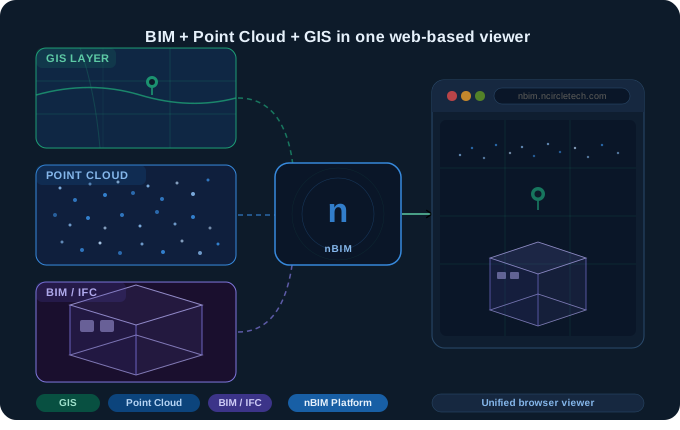
Q: What is nBIM?
nBIM is a web-based BIM platform developed by nCircleTech that lets AEC, infrastructure, and facility management teams visualise BIM models, point cloud data, and GIS maps together in one browser window. No installation required. It supports IFC, LAS, E57, and GIS file formats, handles large files, and includes real-time collaboration, version control, and project management tools.
If you work in construction, infrastructure, or facility management, you know the problem. Your BIM models live in one tool, your point cloud data in another, and your GIS layers somewhere else entirely. Every project review involves exports, screenshots, and emailing a file to stakeholders who cannot open it.
That is the exact problem nBIM was built to solve.
nBIM is developed by nCircleTech – a company with deep expertise in BIM services, scan to BIM automation, and digital twin platforms. It is the product that puts that expertise into a single accessible viewer for your whole project team.
In this post, we walk you through what nBIM is, who it is built for, what it does, and why a unified BIM GIS integration platform is something the AEC industry has needed for a long time.
What is nBIM? A Plain-English Definition
Q: What does nBIM stand for?
nBIM stands for nCircle Building Information Modelling platform. It is a web based BIM viewer and collaboration platform that integrates BIM, point cloud, and GIS data in a single browser-based environment. Unlike traditional BIM tools that require desktop installation and licensing, nBIM works entirely in the cloud and is accessible to all project stakeholders through a browser.
nBIM is a cloud-based platform purpose-built for the modern AEC industry. It brings together three types of spatial data that are almost always kept in separate silos:
- BIM models in IFC format – including direct Revit-to-IFC conversion
- Point cloud files in LAS and E57 formats from laser scans and LiDAR surveys
- GIS layers – geospatial maps that give your model real-world location context
Instead of switching between multiple tools, nBIM puts all of that into one web-based BIM platform that any stakeholder can open from any browser, on any device.
“nBIM is not just another BIM project management software. It is a cutting-edge web-based platform built for the modern AEC industry, offering seamless integration and visualisation of BIM, Point Cloud, and GIS data in a unified context.” – nCircleTech
Who is nBIM Built For?
nBIM is designed for professionals who work with complex spatial data across multiple industries:
1. AEC – Architecture, Engineering & Construction
BIM Managers, VDC Managers, Design Managers, and Project Managers working on building projects face three core pain points that nBIM directly addresses:
- Design vs site mismatch – see exactly where your BIM model diverges from as-built reality using point cloud overlay
- Slow coordination reviews – run BIM clash detection and model reviews in the browser, with all stakeholders viewing the same data simultaneously
- Disconnected teams – give surveyors, designers, and contractors one URL to access and discuss all project data
2. Infrastructure & Transportation
Infrastructure BIM Leads and Digital Twin Managers working on roads, railways, airports, and bridges need GIS context alongside BIM. nBIM’s geospatial viewer places BIM models inside a real-world map. Read more: how digital twins solve infrastructure challenges.
3. Industrial, Oil & Gas & Power Plants
Asset Managers and EPC Engineering Managers dealing with as-built documentation and retrofit planning can load a point cloud scan alongside a BIM model to compare reality capture with design intent – directly in the browser, with no local hardware requirements.
4. Real Estate Developers & Facility Managers
Facility Managers and Digital FM Leads receiving BIM handover packages can use nBIM as a permanent digital repository – a single source of truth for the operations phase. See how scan to BIM supports facility management.
5. Smart Cities, Utilities & Government
GIS Managers and City Digital Twin Managers who need BIM data in a geospatial context for urban planning and cross-department visibility. See how nCircleTech helps teams build digital twin platforms at scale.
What Can You Do With nBIM?
Q: What are the main features of nBIM?
nBIM’s core features include: (1) unified viewer for BIM, point cloud and GIS data; (2) support for files up to 170 GB; (3) BIM model version comparison; (4) real-time collaboration with role-based access control; (5) centralised project and file management; (6) document attachment to GIS objects; and (7) advanced 3D tools including section cuts, model transformation, and first-person navigation.
Unified BIM + Point Cloud + GIS Viewer
Load an IFC BIM model, overlay a point cloud scan (LAS or E57), and place both on a GIS basemap – all in one view. This makes it possible to see how a design relates to real-world geography and surrounding infrastructure without three separate tools open. This is nBIM’s defining capability and the core of its BIM GIS integration value proposition.
Large File Support – Up to 170 GB
nBIM supports files up to 170 GB, including large-scale point cloud datasets from LiDAR surveys. Because it is cloud-based, heavy computation happens server-side, not on your local machine. Critical for point cloud to BIM workflows on large infrastructure projects.
BIM Model Comparison & Version Control
Track changes between model versions using the built-in comparison tool. Identify exactly what changed between design iterations, highlighted in 3D. Version history is maintained automatically for all BIM, point cloud, and GIS files uploaded to the platform.
Real-Time Collaboration With Role-Based Access
Invite team members to view models, leave comments and markups, manage issues, and receive notifications – all within the platform. This BIM collaboration tool removes the need to email files or host separate review meetings. Learn about BIM workflow automation.
Attach Documents to GIS Objects
Attach documents, photos, and notes directly to GIS objects on the map. Particularly powerful for utilities and infrastructure teams linking inspection records or maintenance logs to physical asset locations. See how teams leverage point cloud data for digital asset management.
Supported File Formats
- BIM / IFC – including Revit-to-IFC conversion via the nCircleTech CAD-BIM plugin suite
- Point cloud: LAS and E57 – compatible with the Point Cloud Importer/Exporter for Revit
- GIS / GeoTIFF – geospatial raster and vector data
- PDF, JPEG, PNG – for document attachments and site photos
nBIM vs Traditional BIM Software: What is the Difference?
Q: How is nBIM different from Autodesk BIM 360 or Bentley iTwin?
Key differences: (1) nBIM is browser-based with no installation; Autodesk ACC and Bentley iTwin require desktop software or platform setup. (2) nBIM provides a unified BIM + Point Cloud + GIS viewer in one platform; competitors require separate tools for each data type. (3) nBIM is designed for model viewing and collaboration across all stakeholders, not just licenced authors. (4) nBIM handles files up to 170 GB in the cloud, removing local hardware constraints.
| Feature | Traditional BIM tools | nBIM |
| Access | Desktop install required | Browser – no install needed |
| BIM + Point Cloud + GIS | Separate tools needed | Unified in one viewer |
| File size support | Limited by local hardware | Up to 170 GB cloud-based |
| Stakeholder access | Licence required to view | Any stakeholder via browser |
| Real-time collaboration | Limited or add-on | Built-in, role-based control |
| GIS integration | Separate GIS software | Native GIS viewer built-in |
| Model version control | Manual or add-on | Automatic version history |
For more context: BIM vs CAD – what is the difference | BIM dimensions 3D through 7D explained.
How nBIM Fits Into the nCircleTech Ecosystem
nBIM is part of a wider product suite from nCircleTech. Here is how it connects to the broader ecosystem:
- Scan to BIM Services – nCircleTech converts point cloud scans into accurate BIM models, which can then be loaded into nBIM for review
- ML-Powered Scan to BIM – automated scan-to-BIM using machine learning for faster turnaround
- BIM Model Rule Checker – validate your BIM models against project standards before uploading to nBIM
- Point Cloud Importer for Revit – bring point cloud data into Revit, export to IFC, and view in nBIM
- Deviation nspector – automated construction quality control using point cloud comparison, with results viewable in nBIM
- Digital Twin Platform Development – custom digital twin builds for teams needing more than nBIM provides out of the box
Getting Started With nBIM
- Go to nbim.ncircletech.com and click Sign Up or Book a Meeting to speak with the team
- Create a project and upload your first IFC, LAS, E57, or GeoTIFF file
- Invite your team – assign roles (viewer, editor, manager) and share a link with any stakeholder
- Explore the GIS viewer – place your BIM model and point cloud in geographic context and start collaborating
Ready to see your BIM, point cloud, and GIS data in one view? Get started with nBIM or book a meeting with the nCircleTech team to discuss your project requirements.
Frequently Asked Questions About nBIM
nBIM supports IFC (BIM models including Revit-to-IFC conversion), LAS and E57 (point cloud files from 3D laser scanners), GeoTIFF and GIS layers, and PDF, JPEG, PNG files for document attachments. Large files are supported.
No. nBIM is entirely web-based and runs in any modern browser on desktop or mobile. There is no software to download, install, or update. Any project stakeholder can access models through a shared browser link.
Yes. nBIM supports files up to 170 GB and is designed for large-scale point cloud datasets and corridor-level GIS data. It is suited to roads, railways, airports, utility networks, and other large infrastructure projects.
BIM (Building Information Modelling) contains detailed 3D model data – geometry, materials, and component metadata. GIS (Geographic Information System) provides real-world location, terrain, and spatial context. nBIM integrates both: you can place a BIM model on a GIS map, giving every element of your design a precise geographic coordinate. This BIM GIS integration is nBIM’s primary differentiator.
nBIM is developed by nCircleTech, a technology company specialising in BIM automation, scan to BIM, machine learning for AEC, and digital twin platform development. nCircleTech serves AEC and infrastructure clients globally.
The main differences are: access model (nBIM is browser-based with no installation; Autodesk ACC requires account setup and platform access), data scope (nBIM unifies BIM, point cloud and GIS in one viewer; ACC requires separate tools for GIS and point cloud workflows), and stakeholder reach (nBIM allows any project stakeholder to view models via browser without a software licence).